Tender preparation
Electrical Tender Addenda: Track Changes Through to Price
Review electrical tender addenda, update takeoffs and supplier quotes, and carry each change into the bid price without missing or double-counting work.
8 min read
Follow each tender change from the issued documents to the takeoff, quotations and bid submission.
An addendum can change the equipment, quantities, installation requirements or tender deadline. Receiving the document is only the first step. The change still needs to reach the people and costs affected by it.
For example, an estimator may update a panelboard on the takeoff while the supplier's quotation still covers the original panel. The drawing has been reviewed, but the price is not yet based on the revised equipment.
Use a separate record for each addendum so you can see what was received, what changed, who must act and whether the estimate has been updated. The steps below describe an estimating workflow. Follow the issue, communication and submission instructions for the actual tender.
1. Record what was issued and check the instructions
Record the addendum number, issue date, date received and source. Save the full document and its attachments. Compare your list with the issuer's tender page or document list where available. If a number appears to be missing, investigate rather than assuming it has no electrical content.
Check immediately for changes to the closing date, closing time, question deadline, submission method or required forms. Record the revised instruction and the addendum that gives it. Tell everyone working to the affected deadline, including suppliers and subcontractors whose quotes you need.
If you are quoting to a general contractor, confirm its quote deadline separately from the owner's tender deadline. A change to the owner's closing does not tell you what deadline the general contractor wants you to meet.
Do not use the latest calendar date found in the documents as an automatic closing date. Read what the instruction changes. If instructions disagree, seek clarification through the tender's stated contact route.
Procurement Assistance Canada directs federal bidders to monitor amendments and check closing and submission instructions. That is federal guidance; use the instructions governing your own tender. [1]
2. Read every section for an estimating effect
Read the written instructions and attachments, not only replacement electrical drawings. A revised mechanical schedule, civil detail or construction sequence may change electrical work.
For each change, record:
- The drawing, specification, schedule or instruction affected.
- What has been added, removed or replaced.
- The takeoff items and quotation packages that need checking.
- The person responsible for the update and when it is needed.
- Any question that must be answered before the work can be priced.
Be specific. “Panel P1 changed” does not explain the pricing action. “Replace the P1 equipment quotation, check the associated feeders and include the six added branch circuits” tells the estimator what to review.
If a reviewed item has no effect on your electrical estimate, record why and who checked it. For example, “Room-name correction only; fixture types, quantities and control requirements unchanged.” A blank entry does not show that the change was reviewed.
3. Send the changes to the people pricing the work
Give each affected supplier or subcontractor the addendum and the information needed to revise its quotation. Identify the equipment or work that changed, the relevant document revisions and your required response date.
Keep sending, receiving and pricing separate. An email sent to a supplier shows that you passed on the information. A reply saying “received” shows receipt. Neither confirms that the supplier's price includes the revised work.
Ask for a revised quotation or written confirmation that identifies the addendum and the work covered. Check the new inclusions, exclusions, price validity and delivery information. A supplier's “no price change” response can be useful, but confirm that it refers to the revised requirements rather than the earlier package.
Keep unanswered requests visible. If a revised quotation is still missing, label any internal estimate of its effect as provisional and record the assumptions. Do not treat the missing answer as a zero-cost change.
4. Update quantities and costs without counting work twice
Check the changed drawings against the marked takeoff. Add new work, remove deleted work and replace superseded equipment or assemblies. Check related work such as feeders, supports, terminations, access equipment, testing and specialist attendance where the change could affect them.
Show additions and deductions separately. If an old panel is replaced by a new panel, remove the old equipment cost before adding the replacement. Check what the supplier's revised package already includes before adding accessories or labour elsewhere.
Keep earlier quotations and takeoffs as dated revisions. Mark which revision is now used in the estimate so another estimator can follow the change.
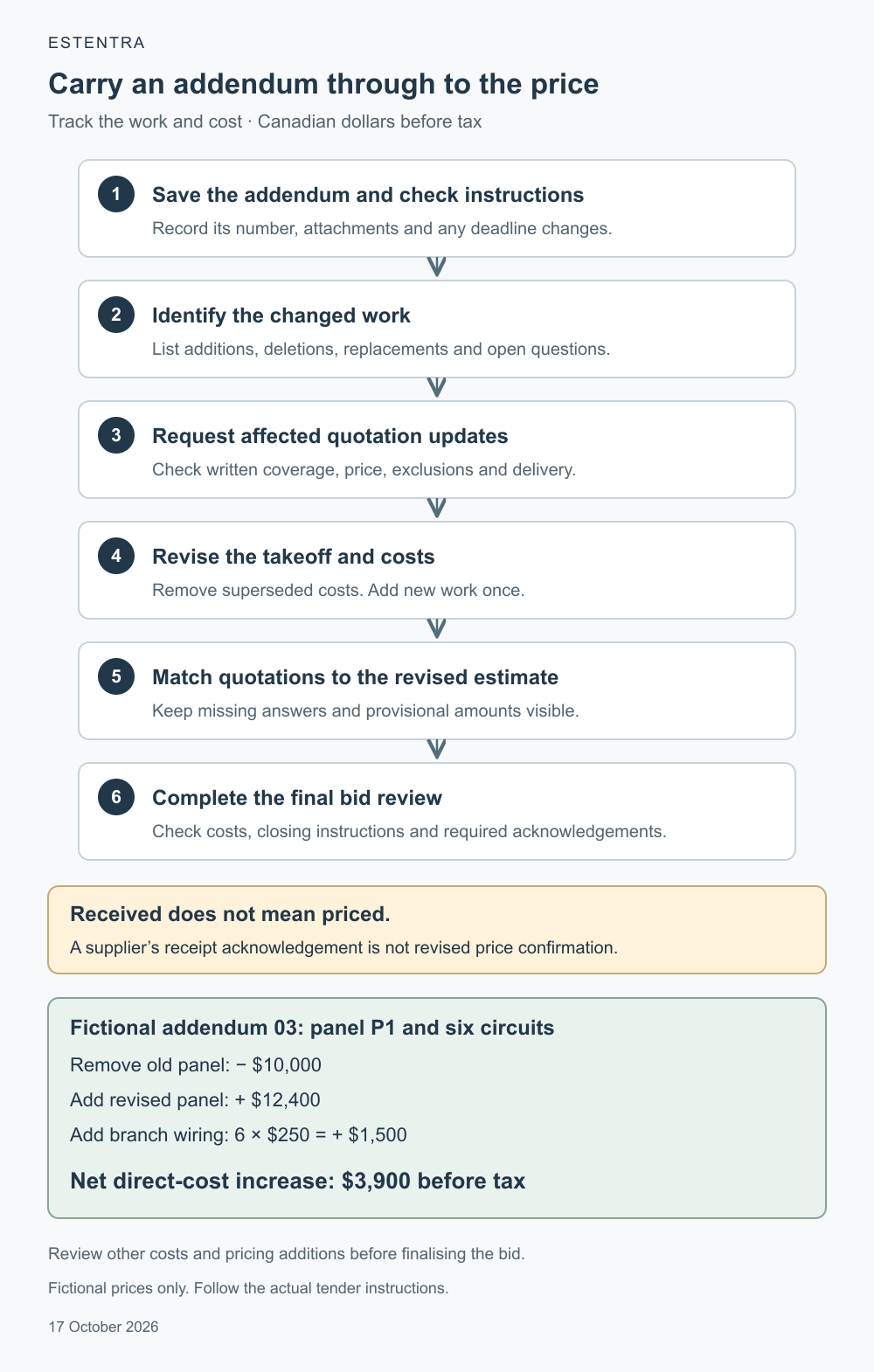
Example: a panelboard replacement and six added circuits
In a fictional tender, addendum 03 replaces panelboard P1 and adds six branch circuits. The original panel quotation is $10,000. After receiving the addendum, the supplier issues quotation Q17 revision 2 for $12,400 and confirms that it covers the revised panel and its required breakers.
The estimator checks the branch routes and prices the added branch wiring at a fictional direct cost of $250 per circuit. That amount covers the branch-wiring material and installation labour. It excludes the breakers already included in the panel quotation. For this example, no other direct costs change.
All figures are in Canadian dollars, before tax and are teaching inputs, not current market rates.
- Remove the original P1 panel cost — Direct-cost change: − $10,000
- Add revised panel quotation Q17 rev 2 — Direct-cost change: + $12,400
- Add branch wiring: 6 circuits × $250 — Direct-cost change: + $1,500
- Net direct-cost increase — Direct-cost change: $3,900
The changed work now costs $12,400 + $1,500 = $13,900, compared with $10,000 before the addendum. The difference is $3,900.
Adding the new panel without removing the old one would overstate the estimate. Updating only the panel quotation would miss the added branch wiring. Adding the breakers again would duplicate a cost already in the revised equipment package.
This calculation checks the direct-cost change only. Before finalising the bid, review whether the change affects project supervision, access, schedule, other costs or the company's pricing additions. Follow the tender's instructions for taxes and bid presentation. Do not assume the final selling-price change is automatically $3,900.
5. Check that the change reached every affected record
For each addendum, confirm that the takeoff, selected quotations and estimate use matching document revisions. Check that the revised costs have reached the bid summary and any affected separate or alternate prices required by the tender.
Use clear review states:
- Received: the issued addendum and attachments are saved.
- Reviewed: the changes and affected work have been identified, including a reason for any “no effect” decision.
- Priced: the takeoff and costs have been updated, with provisional figures still labelled.
- Supplier confirmed: the affected quotations or written confirmations cover the revised work. If no supplier is affected, record that reason.
- Ready for bid review: the remaining questions and conditions have been resolved or referred to the person authorised to approve the estimate, and the submission instructions have been checked.
These are internal recordkeeping labels. They do not replace the tender's requirements or make an unresolved price complete. Keep the specific unanswered question beside any provisional amount so the reviewer can see what still needs a decision.
6. Recheck before submitting
Check the issuer's tender page or other stated issue source again before submission. Allow time to review and price any new information. Compare the issued addenda with your review record and the acknowledgements required on the bid form. If acknowledgement is required, complete it as instructed. Listing an addendum on a form does not prove that you included its work in the price.
Verify the current closing instruction, submission destination and required forms. If a late change leaves instructions or costs unclear, use the specified question process and notify the person approving your estimate. Do not assume that a question or a request for more time changes the closing deadline.
CanadaBuys directs federal bidders to use the stated question process and observe its timelines, including when requesting an extension. [2] Follow the equivalent instructions for your project and rely on an issued change to the deadline rather than an unanswered request.
Before releasing the price, another estimator should be able to follow each addendum from the issued instruction to the changed work, supporting quotation and amount in the estimate. That is the check that turns a received document into a priced change.
References
- Procurement Assistance Canada: Preparing to bid on an opportunity, “Review and understand an opportunity” and “Prepare your bid document.” Federal procurement context.
- CanadaBuys: Checklist for preparing a bid, “Submit questions.” Federal procurement context.
References checked 17 October 2026. The workflow, review labels, panelboard scenario and prices are original educational examples. They do not establish equipment sizing or installation requirements.
General estimating workflow guidance. Project requirements and contractual documents take precedence; this is not electrical design or code-compliance advice.